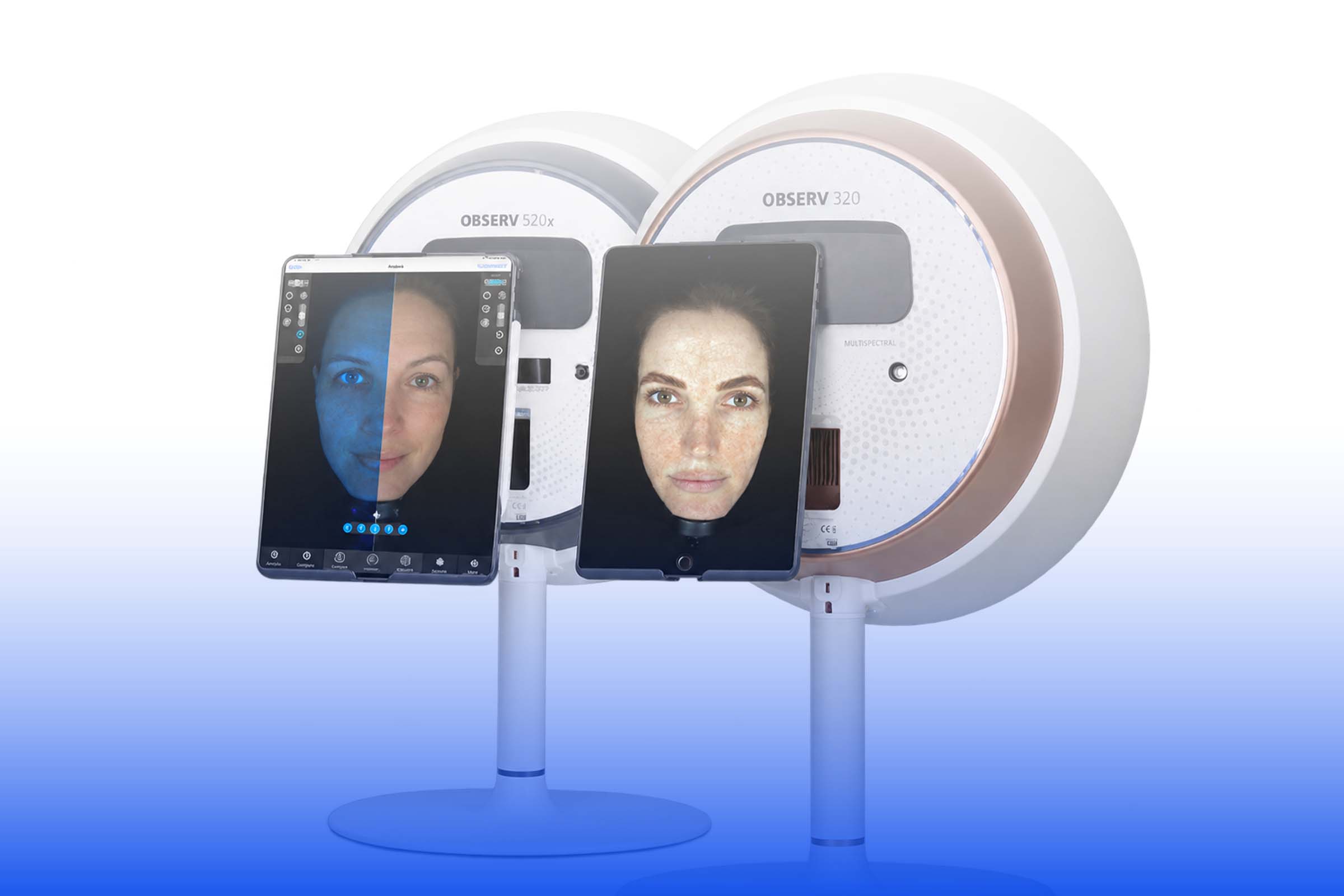
A client comes in asking for a facial. During the consultation, they mention uneven tone, changes in skin texture, and a cupboard full of products they are unsure how to use.
Your team needs to explain what they are observing, understand the client’s priorities, and agree on a sensible next step. A professional skin analysis system can give that conversation a visual starting point.
To choose a professional skin analysis machine in Canada, compare image quality, repeatable positioning, consultation workflow, staff training, data handling, the complete cost in Canadian dollars, and compliance with current privacy regulations. Ask for a demonstration that follows a real consultation, including how you would compare images at a return visit.
This guide is for aesthetic clinic, medical spa, and skincare business owners evaluating equipment for their team.
What does a professional skin analysis machine do?
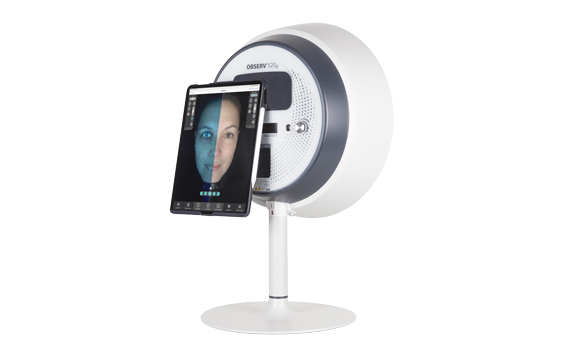
A professional skin analysis machine captures facial images under controlled lighting to help practitioners examine and explain visible skin characteristics. Depending on the system and configuration, different imaging modes can highlight texture changes, pigment distribution, and vascular damage..
For example, Sylton’s OBSERV 520x product information describes daylight, cross & parallel polarization, UV, Woods, and other specialized modes that show different aspects of skin appearance. Available features depend on the selected package.
The practical value is a shared visual reference. Instead of asking a client to understand a description alone, you can discuss an image together, record a starting point, and revisit it later.
Use images alongside the consultation, relevant history, and professional assessment. An image alone should not determine a diagnosis or treatment choice.
Start with the consultation you want to improve
Before comparing specifications, identify where your current consultations become difficult.
- Explaining recommendations: do clients understand why you are suggesting a particular next step?
- Setting priorities: can your team help clients focus on their main concern without overwhelming them?
- Documenting progress: can you compare a return visit with a useful baseline?
- Maintaining consistency: do different team members follow a similar consultation process?
Choose equipment around the job your team will actually do. A long feature list matters less if staff cannot use it comfortably during a normal appointment.
Seven things to compare before buying skin analysis equipment
| What to evaluate | What to ask during the demo |
| Image clarity | Can we clearly see and explain the characteristics relevant to our consultations? |
| Repeatable capture | How does the system help us reproduce positioning, lighting, and angles? |
| Consultation workflow | Can a team member capture, retrieve, and discuss images without disrupting the appointment? |
| Included features | Which modes and software functions are included in this exact quote? |
| Training and support | What onboarding is included, and how do new staff receive training? |
| Image management | Where are images stored, who can access them, and how are they exported or deleted? |
| Total cost | What are the upfront and ongoing costs in CAD? |
1. Evaluate the images your team will use
Ask to see a complete image set and have the demonstrator explain what each view adds. Bring examples of the concerns your clients commonly raise. Ask to review representative images across the skin tones your clinic serves.
A useful question is: “How would I explain this view to a client in plain language?” If the answer is unclear, that is a training requirement to resolve before purchase.
2. Test repeatability at a return visit
Ask the demonstrator to reposition the subject and repeat a capture. Look at how the system helps reproduce the original view and how staff find the previous images.
Write a capture protocol for your team, covering preparation, positioning, lighting mode and timing. Differences in capture conditions can complicate comparisons; a more dramatic-looking image is not automatically evidence of a treatment effect.
3. Walk through the full appointment
Time the process from opening a client record to finishing the discussion. Include preparation, capture, image review, and documentation.
Also consider where the equipment will live. A consultation room, shared treatment room and mobile setup create different practical demands. Check space, connectivity and compatible hardware before ordering.
4. Confirm the exact model and configuration
Do not assume every feature shown in a brochure is included in every package. Sylton’s FAQ explains that OBSERV 520x aesthetic analysis light modes depend on the configuration selected through the local dealer, with activation options available for additional capabilities.
Ask for an itemised quote listing the model, enabled modes, software, compatible tablet requirements, accessories and optional upgrades.
5. Ask how your team will be trained
Training should cover both operating the equipment and discussing images appropriately. Ask what happens when you hire a new practitioner, need help retrieving records or want to improve your consultation workflow.
For a Canadian clinic, confirm support hours, service arrangements, and the availability of training in your team’s language.
6. Understand image storage and consent
Client photography deserves a clear process. Ask the supplier about storage, access controls, backups, export, and deletion. Explain to clients why images are collected and how they will be used.
7. Compare the full cost in Canadian dollars
Request a written CAD quote covering hardware, software, optional features, training, delivery, warranty, and any recurring fees. Clarify applicable taxes and any financing terms separately.
There is no useful universal price without knowing the model and package. A lower initial quote may cover a different configuration or support arrangement. Compare equivalent inclusions before deciding.
Evaluating OBSERV for your clinic? Request an OBSERV demo and a Canadian-dollar quote from DermaSpark. Include your province, current consultation process, and the features you want to see.
How to turn skin images into a useful client conversation
The following is a suggested consultation structure your team can adapt:
- Ask about the client’s priority. Start with what brought them in, their expectations, and relevant history.
- Capture a baseline. Follow your consent and image-capture procedures.
- Explain the relevant views. Focus on observations connected to the client’s concern; avoid presenting every visible characteristic as a problem.
- Agree on a practical next step. Discuss suitable options within your professional scope, including cost, limitations, and alternatives.
- Plan the follow-up. Explain when you will review progress and which images you intend to compare.
For teams offering GeneoX, DermaSpark’s guide to adding GeneoX to a Canadian clinic provides a related treatment-planning and business resource. Keep the equipment decision connected to the services your team is qualified and equipped to provide.
How should you measure the business value?
A skin analysis system supports consultations; Owning one and using it correctly will help increase bookings and retail sales organically. Establish a baseline before introducing it, then monitor whether your workflow is improving.
- The proportion of eligible consultations in which the system is used.
- Average consultation time, including image capture and explanation.
- The proportion of consultations followed by an agreed, appropriate treatment booking.
- Return-visit attendance and the use of comparison images.
- Client feedback on how clearly the plan was explained.
Compare similar periods and note other changes, such as promotions, new staff or pricing. For your business case, calculate additional contribution after the costs of delivering any extra services, then subtract the ongoing costs of the system and extra consultation time. Use your own records and supplier quote rather than a promised industry-wide payback period.
Questions Canadian clinic owners ask
What is the best professional skin analysis machine for a clinic?
The best fit depends on the consultations you offer, the images you need, your team’s workflow, and your budget. Shortlist systems against the same requirements and compare them through a live demonstration.
How much does a skin analysis machine cost in Canada?
Cost depends on the model, enabled features, compatible hardware and support package. Request an itemised quote in CAD and ask about software charges, optional upgrades, delivery, and applicable taxes.
Is skin analysis a treatment?
Skin analysis imaging documents and visualises skin appearance. It is a consultation step, distinct from the treatment or home-care plan that may follow a professional assessment.
Can we charge for a skin analysis consultation?
Your clinic can consider a standalone consultation fee, a fee credited towards a later service, or an included consultation. Base the policy on the time and expertise involved, communicate the terms clearly, and evaluate it against your business model.
Where can I request an OBSERV demonstration in Canada?
DermaSpark offers OBSERV skin analysis systems for Canadian clinics. Its team can discuss the available options and arrange a demonstration through the DermaSpark contact page.
See how OBSERV would fit your consultation process
Bring your questions about imaging, staff training, pricing and follow-up documentation. Ask to see the steps your team would use every day, from the first capture to a return-visit comparison.
Book your complimentary OBSERV demo with DermaSpark.
In your enquiry, mention your clinic name, province, current services and whether you are adding skin analysis for the first time or replacing an existing system.